Object Store
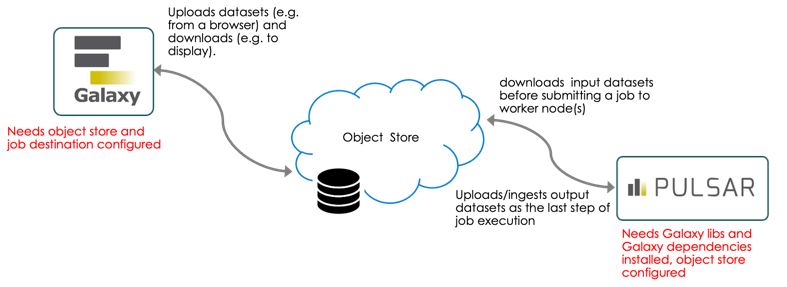
Steps to configure Galaxy/Pulsar to use object store
General configuration
This link describes how to make Galaxy use object store as backend storage instead of local disk. One needs to set a flag in galaxy.yml and provide an object_store_conf.xml file.
More difficult (due to lack of documentation) is how to make jobs that are sent to Pulsar use object store for input/output data
This is our object_store_conf.xml file (templated). We added new parameters there:
     <oidc_provider> - the name of the OIDc provider to use for OIDC tokens verification
     <rucio write_rse_name, write_rse_scheme> - for Rucio plugin - Rucio RSE and scheme to use for file upload
     <rucio_download_scheme rse scheme> - for Rucio plugin, RSE/scheme mapping for file download
Configuring Galaxy Destinations and Pulsar
Galaxy Destinations
Pulsar destination in Galaxy config should be configured for object store. See job_conf.xml for full configuration, we'll take a look at some important pieces below
File actions
file_actions parameter in Job Destination configuration for Pulsar should be set to
"file_actions": {"paths":[{"action":"remote_object_store_copy","path_types":"input"}]}
so that Pulsar uses remote_object_store_copy for input files instead of default one (remote_transfer). If this is not set, Pulsar uses HTTP transfer to get input files from the object store cache on the Galaxy server.
One can set file_actions dynamically in destinations.py file, or in job_conf.xml (using file_action_config parameter)
Remote output mode
We added a destination parameter <param id="remote_output_mode">pulsar</param> to
push output datasets by Pulsar after a job has finished
(by default datasets are pushed to the object store as a part of a job).
Metadata strategy
We need to set metadata_strategy to extended (can be set globally in galaxy.yml, but probably better do it for a specific destination),remote_metadata to true, set a path to Galaxy environment on a worker node and set remote_property_galaxy_home. This is how we do that dynamically in destinations.py:
documentation only says about setting metadata_strategy="extended", nothing about remote_metadata. But we had to set it to true, otherwise, Pulsar still sends data back to Galaxy via HTTP and the job fails anyway due to some missing files.
Pulsar configuration
One has to configure an object store in Pulsar's app.yml file. Since this is a YAML file, the format is different as compared to XML, but the same fields should be set. A constructor for the object store class is then called from Pulsar to create an object store instance. We have our config in Ansible playbook.
It looks something like this:
conda_auto_init: false
conda_auto_install: false
galaxy_home: /opt/galaxy/server
ignore_umask: true
job_directory_mode: '0777'
job_metrics_config_file: job_metrics_conf.xml
managers:
    cloud-cpu1-test:
        num_concurrent_jobs: 5
        type: queued_python
    register-test:
        num_concurrent_jobs: 5
        object_store_config:
            rucio_register_only: true
            rucio_write_rse_name: SNSHFIR_TEST
        set_meta_as_user:
            authentication_method: oidc_azure
            command_prefix: oidc-run-as-user /etc/security/oidc/oidc.json $token -c
        type: queued_python
message_queue_url: amqp://xxx:xxx
object_store_config:
    cache:
        path: /data/object_store_cache_test
        size: 5
    extra_dirs:
    -   path: /data/object_store_workdir_test
        type: job_work
    rucio_download_schemes:
    -   ignore_checksum: true
        rse: SNSHFIR
        scheme: file
    -   ignore_checksum: true
        rse: SNSHFIR_TEST
        scheme: file
    rucio_scope: galaxy_test
    rucio_write_rse_name: CEPH_TEST
    rucio_write_rse_scheme: file
    store_by: uuid
    type: rucio
persistence_directory: /data/persisted_data_test
staging_directory: /data/staging_test
tool_dependency_dir: /opt/pulsar_test/deps
user_auth:
    authentication:
        oidc_azure:
            oidc_jwks_url: XXX
            oidc_provider: XXX
            oidc_username_in_token: preferred_username
            oidc_username_template: *.
            type: oidc
    authorization:
        all:
            type: allow_all
Having that configured, Pulsar should pull input files from the object store before the job starts and push file to the object store after the job has finished.